What Is an Agentic IDE? A 2026 Guide
An agentic IDE lets AI agents plan and execute coding tasks, not just autocomplete. Learn what defines the category, how it differs from AI editors, and where to run agents.
An agentic IDE is a development environment where AI agents can autonomously plan and carry out multi-step coding tasks -- reading the codebase, editing multiple files, running commands and tests, and iterating on the results -- rather than only suggesting the next line of code. The shift is from autocomplete to delegation: you describe an outcome, and the agent does the work while you review.
The term is new and a little overloaded, so this guide defines it clearly, separates the two things people mean by it, and explains how to choose.
One of those meanings now has its own acronym. An ADE, or agent development environment, is a tool organized around agent tasks, isolated workspaces, and review rather than a human editing one working copy. See What Is an ADE? for the full definition.
Autocomplete vs Agent
The first generation of AI coding tools completed code as you typed. You stayed in control of every keystroke; the AI predicted the next few.
An agentic IDE inverts that. You give the agent a task -- "add pagination to the users endpoint and update the tests" -- and it plans the steps, edits the files, runs the test suite, reads the failures, and tries again. You move from writing code to directing and reviewing it. The editor is still there, but it is no longer the center of gravity.
What Makes an IDE "Agentic"
A tool is meaningfully agentic when it can do most of the following without hand-holding:
- Plan a multi-step task from a natural-language goal
- Edit across files, not just the open buffer
- Run the terminal -- build, test, lint, and read the output
- Iterate on errors until the task is done or it asks for help
- Use tools through protocols like MCP to reach docs, databases, and services
Autocomplete and single-file chat do not clear this bar. Planning, multi-file edits, command execution, and iteration are what separate an agentic IDE from an AI-assisted editor.
The Two Kinds of Agentic IDE
In practice, "agentic IDE" refers to two different product shapes.
1. AI editors with an agent mode
These start as editors and add an autonomous agent. You still open files and type, but an agent mode can take over a task end to end. Cursor, Zed, VS Code with GitHub Copilot, and JetBrains with Junie fit here. They are excellent for hands-on work with agent assistance, and several now run multiple agents at once.
2. Agent workspaces
These treat the agent as the primary unit. The product is built around launching many agents, isolating each task, and reviewing and merging what they produce. Superset, Conductor, and Orca fit here. You spend less time typing code and more time directing a fleet of agents.
Both are legitimately agentic. The difference is whether the editor or the agent is the center of the product.
The Multi-Agent Problem
The moment you run more than one agent on the same repository, a new problem appears: collisions. Two agents editing the same working directory will overwrite each other's changes and tangle their branches.
The clean solution is a Git worktree per task. A worktree gives each agent its own directory and branch that share the same repository history, so agents can work in parallel without stepping on each other. You review each worktree's diff independently and merge the ones you want.
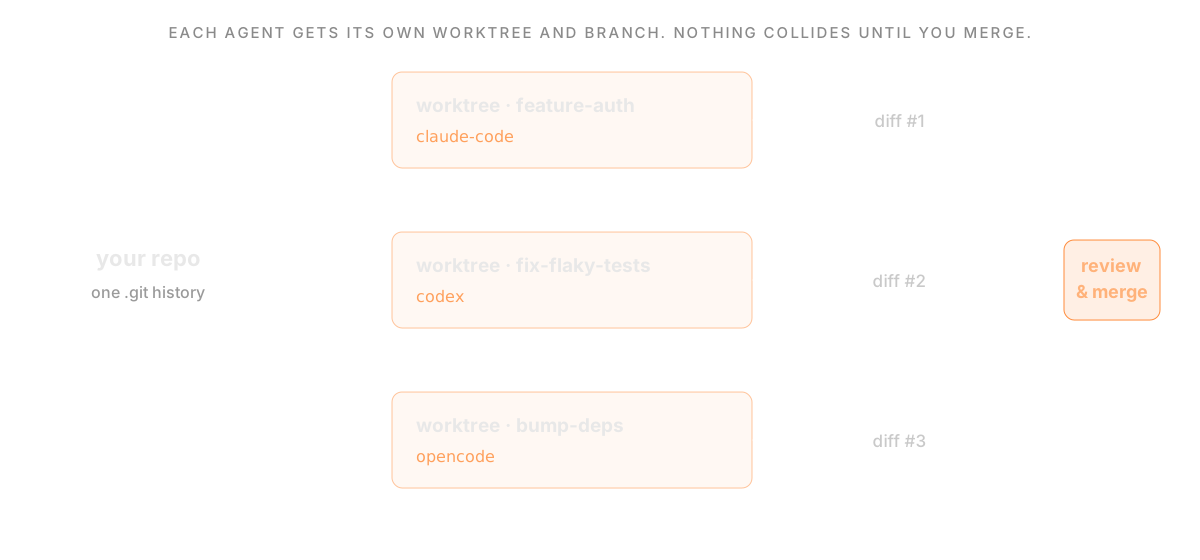 The worktree-per-task pattern: one repository, an isolated worktree and branch per agent, independent diffs converging into review and merge
This is why the strongest multi-agent IDEs are built around worktrees. It is also the dividing line in the category: some tools isolate parallel work in local worktrees (Superset, Orca, Conductor, and Cursor 2.0), some push isolation to the cloud as a branch and a pull request (Copilot, Devin, JetBrains), and some edit the working copy with review gating (Zed and most in-editor agent modes).
Where the Agents Actually Run
An agentic IDE has to run agents somewhere:
- Locally, in worktrees on your own machine, using your real environment and services
- On a remote host you own, over the network
- In the cloud, in a managed sandbox that clones your repo and runs tasks in the background
Local execution keeps everything on your machine and works offline; cloud execution is convenient for fire-and-forget tasks. Some tools do one; a few, like Superset, do both.
How To Choose an Agentic IDE
Start from your bottleneck:
- If you mostly write code with agent assistance, an AI editor like Cursor, Zed, VS Code + Copilot, or JetBrains + Junie is the right home.
- If you want to host external CLI agents inside an editor, look at Zed, JetBrains, and Devin Desktop, which support the Agent Client Protocol.
- If your bottleneck is running many agents on one repository in separate working directories, use an agent workspace built around worktrees, like Superset, Conductor, or Orca.
For a full head-to-head, see Best Agentic IDE in 2026. For agent-specific guides, see Best IDE for Claude Code and Best IDE for OpenAI Codex.
Verdict
An agentic IDE is not just an editor with a smarter autocomplete. It is an environment where agents plan, edit, run, and iterate, and where the hard problems become isolation, review, and orchestration. If you only need agent-assisted editing, an AI editor is enough. If you are running many agents at once, the worktree-per-task workspaces are what the category is really about -- and that is where Superset is built to live.
Frequently Asked Questions
What is an agentic IDE in simple terms?
It is a coding environment where you give an AI agent a task and it plans and executes the steps -- editing files, running commands, and iterating -- instead of only autocompleting code. You direct and review rather than type every line.
What is the difference between an agentic IDE and an AI editor?
An AI editor centers on you writing code with AI assistance. An agentic IDE centers on agents doing tasks autonomously. Many products blur the line: an AI editor with a strong agent mode is agentic, and an agent workspace can still hand off to an editor.
What is a multi-agent IDE?
A multi-agent IDE runs several coding agents at once. Worktree-based workflows separate working files for independent tasks. They do not sandbox processes or prevent merge conflicts. See Best Agentic IDE in 2026.
Do I need an agentic IDE?
If you only occasionally use AI to complete code, a standard editor is fine. If you delegate whole tasks to agents -- especially several at a time -- an agentic IDE built around worktree isolation and review helps keep task changes separate for review; shared services and integration conflicts still need attention.