Superset vs Zed Parallel Agents (2026): Editor Threads or a Dedicated Workspace?
Compare Superset and Zed's Parallel Agents for running multiple coding agents. Isolation defaults, review flow, automations, and when each one fits.
Zed added Parallel Agents in April 2026, and it is the strongest answer yet to running multiple coding agents inside an editor: a Threads Sidebar, per-thread agent choice, and optional Git worktree isolation, all in a fast open-source editor. Superset approaches the same problem from the other side: a dedicated workspace where isolation, session persistence, fleet monitoring, and automations are the product, not a panel. Which one fits depends on whether the editor or the fleet is the center of your workflow.
At a Glance
| Superset | Zed Parallel Agents | |
|---|---|---|
| What it is | Dedicated workspace for orchestrating multiple agents in parallel | Fast editor with agent threads managed in a sidebar |
| Isolation | Git worktrees for local branch-based workspaces | Optional Git worktree per thread; shared working copy by default |
| Agent support | Any CLI agent (Claude Code, Codex, OpenCode, Gemini, Copilot, more) | Zed's built-in agent, ACP external agents (Claude, Codex, Gemini, OpenCode, more), any CLI agent as a Terminal Thread |
| Review and merge | Central diff review per workspace, merge or discard each task | Hunk-level accept/reject in the Agent Panel; worktree threads merge via your normal Git workflow |
| Automations | Scheduled recurring agent runs built in | Not documented |
| Programmatic control | MCP server, CLI, TypeScript SDK | Not documented |
| Platform | macOS (experimental Linux AppImage); source-available ELv2 | macOS, Windows, Linux; open source |
What Is Superset?
Superset is a local-first desktop workspace for AI coding agents. It launches Claude Code, Codex, OpenCode, Aider, Copilot, Cursor Agent, Gemini CLI, Superset Chat, and other agent workflows inside isolated Git worktrees with persistent terminal sessions. Around that core, it adds a built-in diff/file editor, chat panel, in-app browser for docs and dev servers, port management, scheduled automations, and an MCP server for driving everything programmatically. You can review inside Superset or jump into VS Code, Cursor, Windsurf, JetBrains, or Xcode. Source-available under Elastic License 2.0 (ELv2).
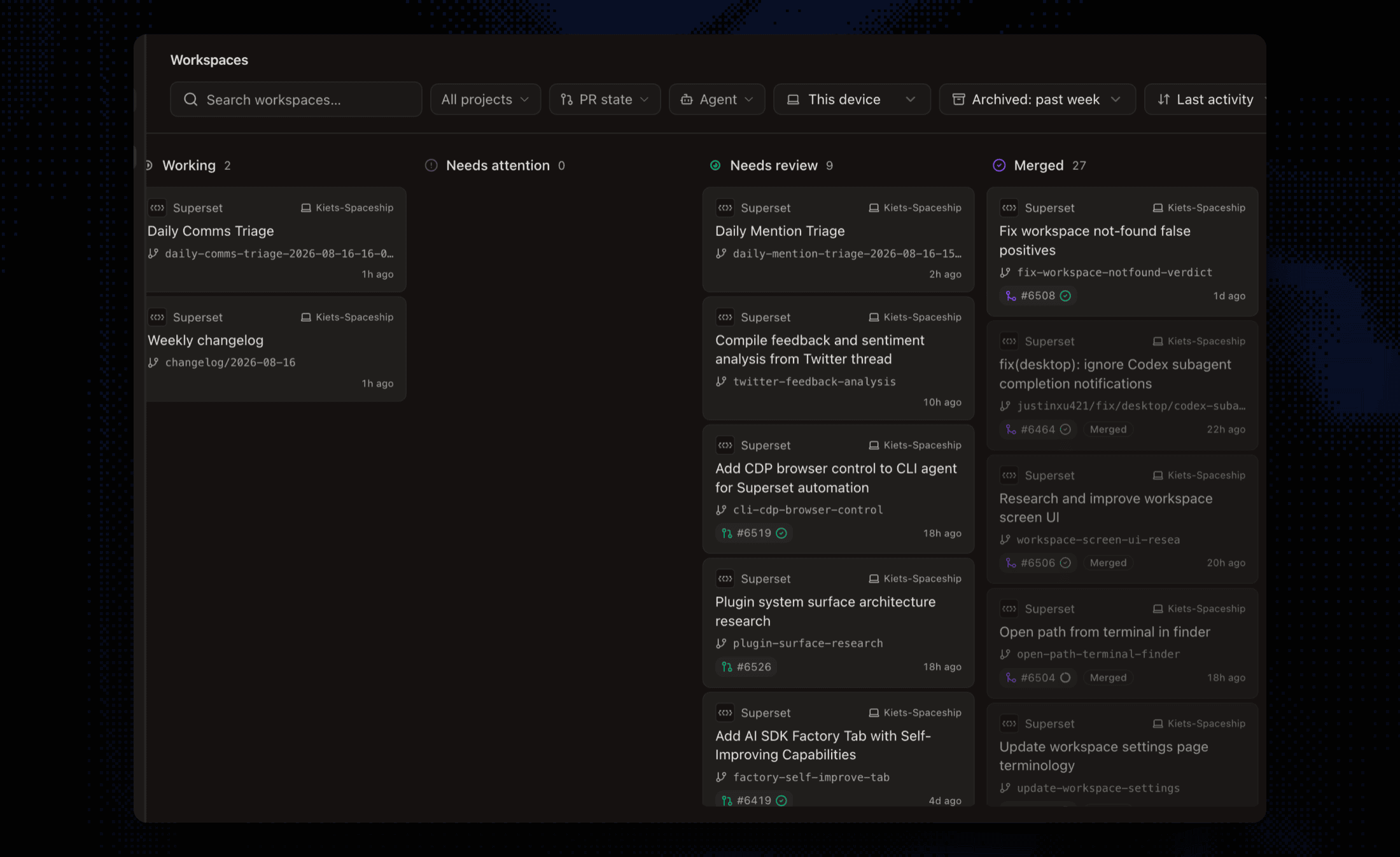 Superset's workspace board showing a fleet of agents triaged by status: working, needs attention, needs review, and merged
What Is Zed Parallel Agents?
Zed is a fast, open-source, Rust-based editor, and Parallel Agents (launched April 22, 2026) makes agent threads a first-class primitive inside it. A Threads Sidebar organizes threads by project; each thread has its own agent, context window, and conversation history. Threads come in three types: Zed's built-in agent, external agents over ACP (Claude, Codex, Gemini CLI, OpenCode, Copilot, and others), and Terminal Threads that wrap any CLI or TUI agent. Threads can optionally run in their own Git worktree, and the Agent Panel offers hunk-level review with checkpoints. Zed's Personal plan is free with your own keys or external agents; Pro ($10/month) and Business ($30/seat/month) add hosted-model tokens and governance.
Key Differences
Isolation by Default vs Isolation on Request
This is the biggest practical difference. New local branch-based Superset workspaces get separate worktrees and branches. That separates working files but does not prevent merge conflicts or shared-service interference. In Zed, threads share your working copy unless you deliberately start one in a new worktree, and Zed's own docs advise isolating threads that might touch the same files. Opt-in isolation is flexible for quick edits, but at fleet scale the discipline burden shifts to you: forget once, and two agents are editing the same checkout.
Editor-Centered vs Fleet-Centered
Zed's model shines when you live in the editor: threads sit beside your code, you watch an agent's edits land in buffers you can immediately touch, and review is hunk-by-hunk in place. Superset's model shines when the fleet is the unit of work: a dashboard of every workspace and session status, diffs reviewed per task, and agents you check on rather than watch. With a few threads the two feel similar. Past that, one editor window shows you one agent at a time, and there is no single view of every session's status.
What Happens After the Agents Finish
For worktree-isolated threads, Zed hands you back to your normal Git workflow: review the diff, merge it yourself. Superset treats merge-or-discard per task as part of the product, alongside port management for concurrent dev servers and worktree lifecycle cleanup. Zed does offer excellent in-panel review (accept or reject individual hunks, restore checkpoints) for threads editing the working copy.
Automations and Programmatic Control
Superset runs scheduled automations (recurring prompts on a cron-like schedule in fresh workspaces) and exposes an MCP server, CLI, and SDK so scripts or other agents can create workspaces, launch agents, and collect results. Zed has no documented scheduling or orchestration API; threads start when you start them. If agents-driving-agents or overnight runs are part of your workflow, this is a category difference, not a feature gap.
Openness and Platforms
Zed is fully open source and runs on macOS, Windows, and Linux. It supports local models, and with your own keys or external agents the free tier has no limits. Superset is source-available (ELv2) and macOS-first with an experimental Linux AppImage. If Windows or OSI-approved licensing is a hard requirement, Zed wins that row outright.
Pricing
Both are free to start. Zed's Personal plan is free forever, with paid tiers ($10/month Pro, $30/seat Business) buying hosted-model usage and org governance rather than the parallel-agents feature itself. Superset offers a free tier and paid seats. With your own keys or external agents, neither product touches your model traffic; Zed's optional hosted-model path bills through Zed at API list price plus 10%, while Superset has no hosted-model path at all.
Which Should You Choose?
Choose Superset if you:
- Run enough concurrent agents that isolation must be automatic, not remembered
- Want fleet-level monitoring, per-task review, and worktree lifecycle handled for you
- Need scheduled automations or programmatic control (MCP, CLI, SDK)
- Prefer to review in Superset or hand off to the editor you already use
Choose Zed Parallel Agents if you:
- Want parallel agents inside a fast editor you also write code in
- Value open source, Windows/Linux support, or local models
- Run a few threads at a time and are happy managing worktrees per thread yourself
- Want hunk-level in-buffer review as your primary flow
Verdict: Zed built the best editor-native version of parallel agents, and if the editor is your center of gravity it is an easy recommendation. Superset is the better fit when parallel agents stop being a feature you use inside the editor and become the workflow itself: always-isolated tasks, a monitored fleet, scheduled runs, and orchestration other software can drive. The two also pair: Zed for the hands-on thread, Superset for the fleet.
Frequently Asked Questions
Does Zed isolate parallel agents in Git worktrees?
Optionally. Zed threads share your working copy by default, and you can start a thread in a new worktree when it might conflict with others. Superset creates a worktree for each new local branch-based workspace; cloud workspaces use clones and projectless sessions use scratch folders.
Can Zed and Superset run the same agents?
Largely yes. Both run Claude Code, Codex, Gemini CLI, OpenCode, and other CLI agents; Zed adds its own built-in agent and ACP integrations, while Superset is agent-agnostic across anything that runs in a terminal.
Does Zed have scheduled automations?
No scheduling or recurring agent runs are documented in Zed. Superset includes automations that run a prompt on a schedule in a fresh or existing workspace.
Is Zed really free for parallel agents?
Yes. Parallel Agents works on Zed's free Personal plan when you bring your own API keys or external agent subscriptions; paid plans add hosted-model tokens, edit predictions, and business governance.
Can I use Zed as my editor and Superset for orchestration?
Yes. Superset manages the worktrees, sessions, and review, and you can open any workspace in your preferred editor. Many developers pair a dedicated orchestrator with whatever editor they are fastest in.