Git worktrees have been around since 2015. For most of that time, they were a curiosity: something kernel developers used, something that showed up in obscure Stack Overflow answers, something most developers had never heard of.
Now they're having a moment. AI coding agents need isolated environments. Developers are working on multiple features simultaneously. Code review culture demands quick context switches. The workflows that make worktrees valuable finally caught up to the feature.
This is the story of how worktrees came to be, how they actually work under the hood, and why they suddenly matter.
Part I: The Problem Before Worktrees
The Pain of Context Switching
Every developer knows this workflow:
The friction isn't just the commands. It's the mental overhead. Your editor reloads files. Your language server re-indexes. Your node_modules might need reinstalling. Your brain has to context-switch twice.
For years, developers worked around this with various hacks:
Multiple clones: Clone the repo twice. Work in one, switch in the other. But now you have two copies of the entire history, two sets of remotes to configure, and changes in one don't appear in the other without pushing and pulling.
git stash gymnastics: Stash everything, switch, work, switch back, pop. Works until you have multiple stashes and forget which is which. Or until you realize you stashed something you actually wanted to commit.
Just don't switch: Finish what you're doing before touching anything else. Works until your coworker needs an urgent review or production is on fire.
The git-new-workdir Script
Before official worktrees, git shipped a contributed script called git-new-workdir. It lived in contrib/workdir/git-new-workdir and did something clever but hacky: it created a new working directory and symlinked the .git internals.
Under the hood, it would:
- Create a new directory
- Symlink
.git/objects,.git/refs,.git/config, etc. - Create a separate
HEADandindexfor the new directory
It worked, mostly. But symlinks are fragile. The script wasn't officially supported. It didn't handle all edge cases. It was a hack, and everyone knew it.
The git community wanted something better.
Part II: Worktrees Land in Git 2.5
July 2015: The Feature Arrives
Git 2.5, released on July 29, 2015, introduced git worktree as a first-class feature. The primary author was Nguyễn Thái Ngọc Duy, who had been working on the concept for years.
The GitHub blog announcement described the new capability:
"Each linked working tree is a pseudo-repository with its own checked-out working copy. Its
.gitis actually a file that refers to the history and references from the main repository."
Notably, the feature shipped with a warning: it was labeled experimental, with caveats about potential bugs and a recommendation against using it with submodules. A decade later, these rough edges have been smoothed out.
The initial commit message laid out the vision:
"A git repository can support multiple working trees, allowing you to check out more than one branch at a time."
The idea: a git repository is really two things:
- The object store: All your commits, trees, and blobs (the
.git/objectsdirectory) - The working state: What's currently checked out, staged, etc.
These don't have to live in the same place. Worktrees formalized this separation.
The Implementation
When you create a worktree, git does the following:
- Creates a new directory at the path you specified
- Creates a
.gitfile (not directory) in that location pointing back to the main repo - Creates an entry in
.git/worktrees/<name>/in the main repo - Checks out the branch in the new working directory
The new directory's .git is just a file containing:
And in the main repo, .git/worktrees/feature-branch/ contains:
This architecture means:
- Shared objects: Commits, trees, blobs exist once
- Shared refs: Branches and tags are visible from all worktrees
- Separate working state: Each worktree has its own HEAD, index, and working directory
The One Branch Rule
Git enforces a constraint: a branch can only be checked out in one worktree at a time. Try to check out the same branch twice and you'll get:
This prevents a class of confusing bugs. If two worktrees had the same branch and you committed in one, the other would have a dirty diff appear out of nowhere.
You can work around this with detached HEAD or by creating a new branch, but the protection is intentional.
Part III: The Anatomy of a Worktree
What Lives Where
Understanding the file layout helps demystify worktrees:
What's Shared, What's Not
| Shared Across Worktrees | Separate Per Worktree | |-------------------------|----------------------| | Object store (commits, blobs) | Working directory files | | Branch refs | HEAD (current branch) | | Tag refs | Index (staging area) | | Remote configuration | Untracked files | | Hooks | Local modifications | | Config (mostly) | MERGE_HEAD, REBASE_HEAD, etc. |
This means:
- Commits made in one worktree are immediately visible in others
- But the files on disk are completely independent
- You can have different uncommitted changes in each worktree
Garbage Collection and Pruning
Git tracks which worktrees are valid. If you delete a worktree directory without using git worktree remove, git doesn't immediately know. The metadata in .git/worktrees/ persists.
This checks each entry in .git/worktrees/ and removes any whose gitdir points to a non-existent directory.
Git also runs this automatically during garbage collection, so orphaned metadata doesn't accumulate forever.
Part IV: Why Worktrees Stayed Niche
For almost a decade, worktrees remained a power-user feature. Most developers had never heard of them. Why?
1. The Single-Branch Workflow Dominated
Most teams followed a simple pattern:
- Create feature branch
- Work until done
- Open PR
- Merge
- Delete branch
This is linear. You finish one thing before starting another. Worktrees solve parallel work, but most people weren't working in parallel.
2. Git GUIs Didn't Support Them
Popular git interfaces (GitKraken, SourceTree, GitHub Desktop, VS Code's git panel) either didn't support worktrees or treated them as second-class. If your tool doesn't expose a feature, you don't use it.
3. The Commands Were Obscure
Compare:
The worktree command is longer, requires a path argument, and the mental model (multiple working directories) is unfamiliar. Without a forcing function, people stick with what they know.
4. Disk Space Concerns
Each worktree is a full checkout of the repository. For large repos, this adds up. In the age of spinning disks and smaller SSDs, this mattered more than it does now.
Part V: Why Worktrees Are Having a Moment
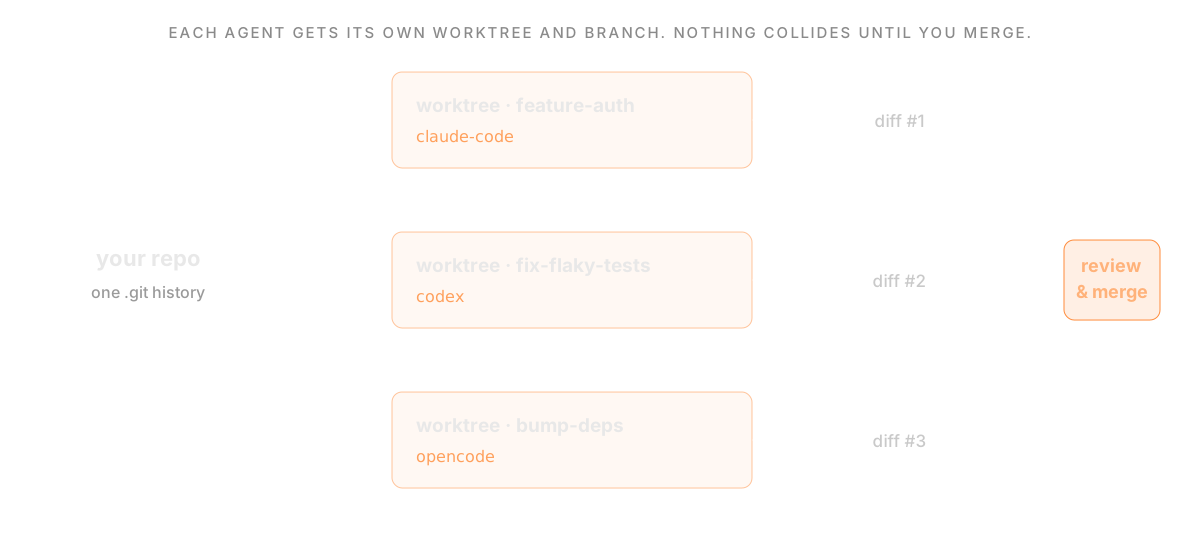 The pattern that revived worktrees: a repository fanning out into a worktree per coding agent, each on its own branch with an independent diff
Several shifts have made worktrees suddenly relevant:
1. Code Review Culture
Modern development is interrupt-driven. You're working on feature A when:
- Someone requests a review on feature B
- You need to verify a bug exists on main
- A hotfix needs immediate attention
Each interruption previously meant stash/switch/pop. With worktrees, you open a different directory. Your feature A context is untouched.
2. CI/CD and Local Testing
Complex projects often need you to test against different branches. Does this PR break when merged with that other PR? With worktrees, you can have both checked out and test interactions without rebasing.
3. Monorepo Workflows
Large monorepos make cloning expensive. If your repo is 10GB, cloning it twice for parallel work wastes 10GB. Worktrees share the object store, so each additional worktree only costs the size of the working files.
4. AI Coding Agents
This is the big one.
When an AI agent modifies code, it needs somewhere to work. If it works in your directory, you have a problem:
- Your files change while you're editing
- You can't easily diff agent changes vs your changes
- Agent experiments pollute your working tree
Worktrees solve this elegantly:
The agent can:
- Make changes freely
- Commit to its own branch
- Run builds and tests
- Iterate without affecting you
When it's done, you review the diff and merge. It's the same workflow as reviewing a coworker's PR, but the coworker is an AI and works in a worktree instead of a fork.
This pattern (parallel human + AI work on the same codebase) is driving a resurgence in worktree usage that the git developers probably never anticipated.
Part VI: Worktrees Under the Hood
For those who want to understand the internals:
How git Finds the Repository
When you run a git command, git needs to find the .git directory. The search algorithm is:
- Look for
.gitin current directory - If
.gitis a file, read its contents forgitdir:path - Follow that path
- If that path contains a
commondirfile, the common git dir is elsewhere
This indirection is how worktrees work. The linked worktree has a .git file, not directory, and git follows the chain.
The commondir Mechanism
Each linked worktree's git directory (e.g., .git/worktrees/feature/) contains a commondir file pointing to the main .git directory.
When git needs something shared (objects, refs), it uses commondir. When it needs something worktree-specific (HEAD, index), it uses the worktree's directory.
The code that handles this is in setup.c and path.c in the git source. The function get_common_dir() resolves the path for shared resources.
Lock Files and Concurrent Access
Multiple worktrees can run git commands simultaneously. Git uses lock files to prevent corruption:
.git/index.lock: Prevents concurrent index modifications.git/refs/heads/<branch>.lock: Prevents concurrent ref updates.git/worktrees/<name>/locked: Marks a worktree as locked (won't be pruned)
The worktree-specific lock is useful when a worktree is on removable media or a network drive that might be temporarily unavailable.
Part VII: Getting the Most from Worktrees
If you're convinced worktrees are worth adopting, here's how to use them well:
Organize Your Worktrees
Keep worktrees in a predictable location:
Or keep them adjacent to the main repo:
Pick a convention and stick with it.
Name Worktrees After Branches
Reduces confusion:
Now the directory name matches the branch name.
Create a Helper Function
Add to your shell config:
Clean Up When Done
Worktrees are cheap to create and should be cheap to discard:
Don't let old worktrees accumulate.
Remember the Limitations
- Can't checkout the same branch in multiple worktrees
- Can't nest worktrees inside each other
- Submodules need separate initialization per worktree
- Some IDE features might not understand worktrees
Conclusion
Git worktrees are a decade-old feature whose time has finally come. They solve parallel work, something that didn't matter much when developers worked linearly, but matters immensely now that AI agents are writing code alongside us.
The implementation is elegant: share the expensive stuff (object store), separate the cheap stuff (working directory). It's the same insight that makes containers efficient: share the base, isolate the differences.
Whether you're reviewing PRs, testing branches, or letting an AI agent work in parallel, worktrees provide isolation without duplication. They're not new technology. They're old technology that suddenly fits the moment.
If you've been stashing to switch branches, maybe stop. There's a better way, and it's been there all along.
Related: Git Worktrees for AI Coding Agents · Best Agentic IDE in 2026
Related Posts
The Terminal That (Almost) Never Dies: Building a Persistent Terminal Daemon for Electron
How we built a process-isolated terminal host that survives app restarts, handles backpressure gracefully, and enables cold restore from disk.

How to get hit (probably in the face but anywhere else works too)
I ran out of technical content to write for the blog so here is something I am interested in instead.
