How to Run Multiple Claude Code Agents in Parallel
Learn the safest way to run multiple Claude Code sessions at once. Compare terminal tabs, tmux, manual Git worktrees, and Superset's orchestration workflow.
Claude Code is excellent at deep, single-task work. The moment you want three agents writing tests, fixing lint, and refactoring a service at the same time, the bottleneck is no longer model quality. The bottleneck is workflow.
The safe way to parallelize Claude Code is simple: give every session its own Git worktree, its own branch, and a review step before anything lands on your main branch.
The Real Problem
Running multiple Claude Code sessions is easy. Running them without stepping on each other is the hard part.
If two sessions share one working directory, they can both edit the same files, overwrite each other's changes, and leave you with a review mess. Even when they touch different files, you still have to remember which branch belongs to which task, which terminal owns which session, and what changed where.
That is why "multiple agents" is really an isolation problem first and an interface problem second.
The Three Common Approaches
1. Multiple Terminal Tabs or tmux Panes
This is where most people start. Open a few tabs, run claude in each, and keep a mental map of which session owns which task.
It works for quick experiments, but it has two problems:
- no automatic Git isolation
- no single place to review diffs across sessions
If every tab points at the same checkout, parallelism becomes unsafe immediately.
2. Manual Git Worktrees
This is the Git-native way to do it. You create a separate worktree and branch for each Claude Code session:
Then you cd into each directory and launch Claude Code there.
This is safe and effective. It is also repetitive. You still have to create branches, name directories, track which session maps to which task, and review each diff manually in your editor or Git UI.
3. Superset + Claude Code
This is the same worktree-based approach, but automated.
Superset creates an isolated worktree per task, launches Claude Code inside it, keeps the sessions organized, and gives you one place to review the resulting diffs. Claude Code still does the coding. Superset handles the orchestration.
That is the key distinction: Claude Code is the agent; Superset is the workflow layer that lets you run many Claude Code sessions safely.
Quick Comparison
| Approach | Parallel? | Isolated by default? | Review workflow | Ongoing overhead |
|---|---|---|---|---|
| Terminal tabs | Yes | No | Manual | Low setup, high risk |
| tmux | Yes | No | Manual | Good for power users, still no isolation |
| Manual Git worktrees + Claude Code | Yes | Yes | Git-native, but manual | Safe, but repetitive |
| Superset + Claude Code | Yes | Yes | Built-in diff review per task | Lowest overhead once installed |
Recommended Workflow
1. Break work into independent tasks
Good parallel tasks:
- write tests for module A
- refactor service B
- update docs for feature C
- fix lint or type errors in package D
Bad parallel tasks:
- three agents touching the same core file
- tasks that depend on one unfinished refactor
- anything where you do not yet know the right architecture
Parallelism works best when each agent can finish a reviewable unit of work on its own branch.
2. Give every session its own worktree
This is the non-negotiable part.
If you are doing it manually, use git worktree add for every task before launching Claude Code. If you are using Superset, create one task per job and let Superset provision the worktree and branch automatically.
3. Keep prompts narrow
Claude Code performs better in parallel when each session has a tight, outcome-based prompt:
- "Add table-driven tests for
normalizeUserInputand stop when they pass." - "Refactor the billing service to remove duplicate retry logic without changing external behavior."
- "Document how background jobs are retried in the API README."
Avoid mega-prompts that ask one session to do design, implementation, and cleanup across the entire repo. Those are better done sequentially.
4. Review each diff before merging
Parallel agents increase output, not certainty.
The right loop is:
- dispatch several narrow tasks
- review the finished diffs one by one
- merge the good ones
- spawn follow-up tasks from the remaining gaps
This is why worktrees matter so much: every agent output stays isolated until you decide what lands.
Why Superset Fits This Workflow
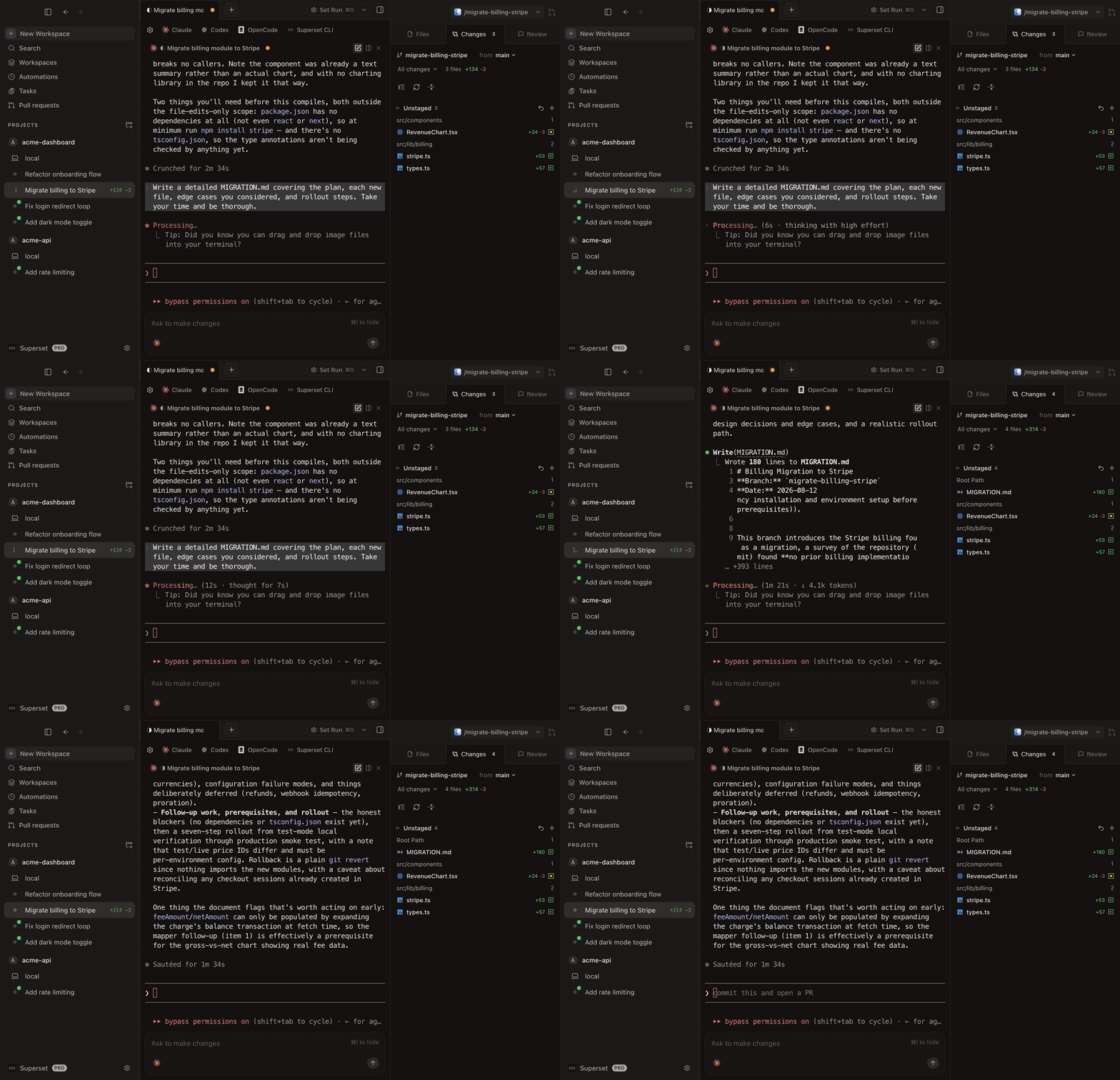 Claude streaming a billing migration in one Superset workspace while other Claude Code agents run in parallel workspaces
Superset is useful here because it removes the boring parts of manual parallelism:
- separate worktree per task
- separate branch per task
- persistent terminal sessions
- one interface for reviewing outputs
If you already like Claude Code, Superset is not a replacement. It is the layer that makes multiple Claude Code sessions manageable.
For a product comparison, see Superset vs Claude Code.
When Manual Worktrees Are Enough
You do not need another tool if:
- you only run one or two Claude Code sessions occasionally
- you are comfortable living in Git and tmux all day
- you prefer assembling your own workflow from terminal tools
Manual worktrees are still the correct primitive. Superset just packages that primitive into a faster operating model.
Verdict
If you want to run multiple Claude Code agents in parallel, the decision is not really "Claude Code or Superset."
The real choice is:
- Claude Code alone, one task at a time
- Claude Code plus manual worktrees, with more setup overhead
- Claude Code plus Superset, with the same isolation model but less operational friction
For most teams and solo developers, worktree-based orchestration is the difference between "parallel in theory" and "parallel every day."
Frequently Asked Questions
Can Claude Code itself run multiple agents?
You can run multiple Claude Code sessions, but each session still needs its own safe workspace. Claude Code is the agent process. The missing piece is orchestration and isolation across sessions.
Do I need Git worktrees to parallelize Claude Code?
If you care about safety, yes. Separate worktrees keep each session on its own branch and working directory, which prevents overlapping changes from colliding in one checkout.
Is tmux enough?
tmux is enough to manage panes and sessions. It is not enough to isolate file changes by itself. You still need a Git workflow, usually worktrees, underneath it.
Is Superset only for Claude Code?
No. Superset can orchestrate Claude Code, Codex, OpenCode, Aider, and other CLI agents. Claude Code is just one of the strongest fits for the workflow.